.png)
Client Event Invites That Fill the Room: iMessage RSVPs From Your Own iPhone
Client appreciation events only work if people show up. Here's who to invite, what to text, and how to follow up with personal iMessages from your own iPhone.
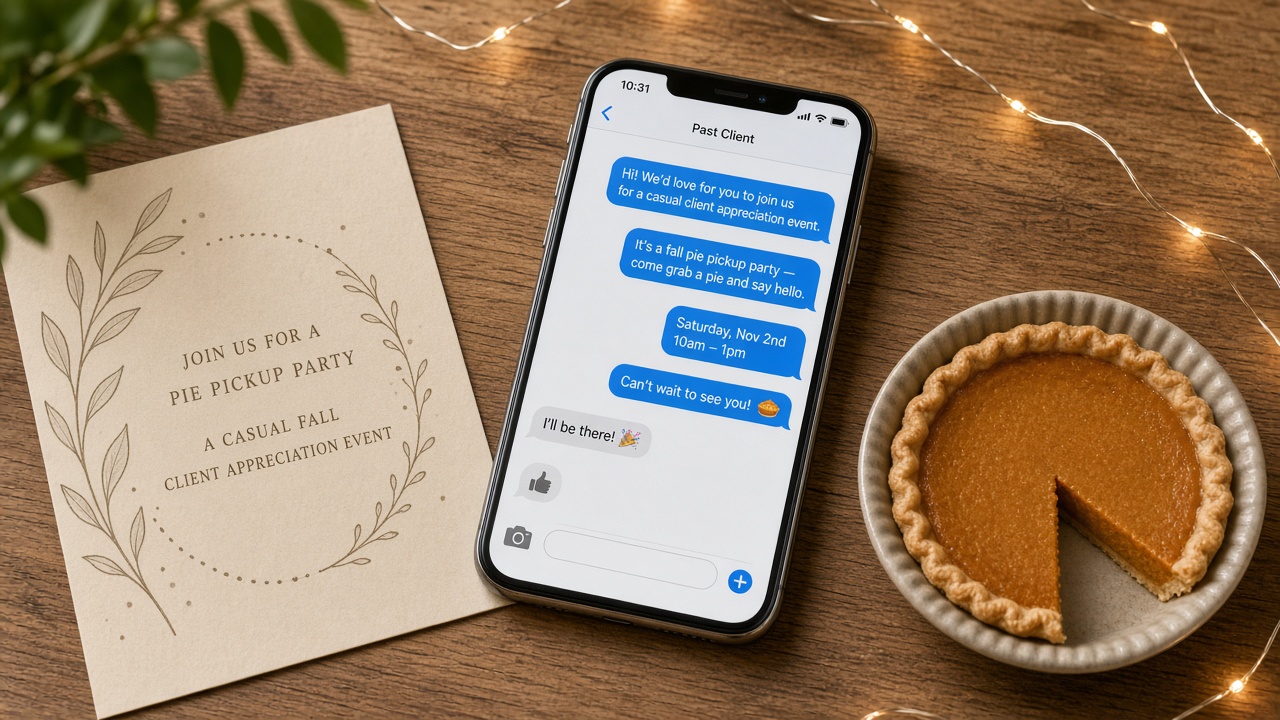
A client appreciation event is one of the best ways to stay close to the people who already trust you. A fall pie pickup, a holiday photo day, a summer ice cream truck, or a simple coffee morning gives past clients a reason to stop by, bring a friend, and remember who helped them. The hard part is not planning the event. It is getting people to actually show up. Email invitations get buried, mailed cards get set on the counter, and social posts disappear in a few hours.
A short, personal iMessage from your own iPhone solves that. It arrives as a blue bubble from a name they already have saved, it is easy to answer with a quick "We'll be there," and it lets you follow up one person at a time. This guide covers why text invitations get better turnout, who to invite, what to say before and after the event, and how to keep it personal when your list is long. LightSend helps you plan each message and reminds you when it is due. You still tap to send every message yourself, so each invite sounds like you and goes only to the people you choose.
Why event invites work better by text
Most people decide whether to attend an event in the first few seconds after they see the invite. If that moment happens in a crowded inbox, the answer is usually "maybe later," and later never comes. A text from your own number changes that moment.
- It gets seen. Texts are read quickly, and a message from a saved contact does not compete with promotions and newsletters.
- It is easy to RSVP. Replying "Yes, count us in" takes two seconds. There is no form, link, or login.
- It starts a conversation. People ask questions like "Can I bring my sister?" or "Is it kid friendly?" Those replies are warm moments you can build on.
- It feels personal. An invite from your own iPhone reads like you thought of them, not like they were added to a mailing list.
Why your own iPhone, not a texting platform
Many texting tools send from a shared or rented number through a third-party service. Messages arrive as green bubbles from a number nobody recognizes, and people treat them like marketing. That is the opposite of what a client appreciation event is about.
When the invite comes from your own iPhone and your own number, it lands in the same thread as your past conversations with that client. They see your name, they remember the closing, and they know a real person is waiting for their answer. Every reply comes straight back to you, so you can respond in the moment instead of checking a separate dashboard.
Who belongs on your invite list
Start with the people most likely to come and most likely to bring someone new:
- Past clients from the last few years. They know you, they live nearby, and many of them have friends who will buy, sell, or refinance soon.
- Referral partners. Agents, lenders, title officers, inspectors, and other partners appreciate being included, and they often bring their own clients.
- Current clients. People in the middle of a transaction get to meet your community and feel more confident about working with you.
- Your personal sphere. Neighbors, friends, and people you know from church, school, or sports teams are often your best source of introductions.
Keep the list to people you would genuinely be happy to see. A smaller, warmer guest list beats a big list of names you barely know.
The invite sequence: four simple texts
You do not need a long campaign. Four well-timed messages cover nearly every event.
1. The personal invite (two to three weeks out)
Lead with the person, then the event, then a simple question. For example:
"Hi Maria! We're doing a little pie pickup for past clients on Saturday, November 21 from 10 to 1. I'd love to see you and Dan. Want me to save you a pie?"
Asking "Want me to save you a pie?" is easier to answer than "Please RSVP." It turns the invite into a yes or no question.
2. The gentle nudge (about a week out)
Only send this to people who have not answered yet, and keep it light:
"Hey Maria, just checking in on the pie pickup next Saturday. No pressure at all, I just want to make sure I have enough. Pumpkin or apple?"
3. The day-before reminder (only for yeses)
A short reminder for people who said yes keeps turnout high:
"Looking forward to seeing you tomorrow! We'll be at the office on Main Street from 10 to 1. Feel free to bring a friend."
That last line is where new relationships start. Guests who bring a neighbor or coworker introduce you to someone new in the friendliest setting possible.
4. The thank-you (the day after)
The follow-up is where the event pays off. Thank people who came and check in with people who could not make it:
"So good to see you yesterday, Maria! Thanks for bringing Jess. If she ever has questions about buying, I'm happy to help."
"Missed you at the pie pickup! I still have one with your name on it if you want to swing by this week."
Keep it personal at scale
When your list has a hundred or more names, it is tempting to blast one message to everyone. Resist that. Group texts are awkward, reply-all threads annoy people, and identical messages feel like spam. A few habits keep every invite personal without taking all day:
- Write one base message per group. Past clients, partners, and friends each get a slightly different invitation.
- Use first names and one personal detail. "Bring the kids" or "I'd love to hear how the new kitchen turned out" goes a long way.
- Send in small batches. Ten or twenty invites at a time lets you answer replies as they come in.
- Track responses. Note who said yes, who said no, and who has not answered, so the nudge and reminder go to the right people.
LightSend is built for exactly this. You can build your invite, nudge, reminder, and thank-you messages once, personalize each one, and get a reminder when it is time to send. You review and tap send for every message, so nothing goes out that you have not seen. If you are a loan officer using RateUpdate.io, LightSend integrates with it, so your past borrowers are easy to include.
Event ideas that get people to show up
The best client events are short, casual, and easy to attend. A few that work well by text:
- Pie pickup before Thanksgiving, where people grab a pie and say hello.
- Holiday photo day with a local photographer taking free family portraits.
- Shred day in the spring, where people bring old documents to a mobile shredding truck.
- Ice cream social or food truck lunch in the summer.
- Coffee and donuts on a Saturday morning at your office.
Each one gives you a natural, no-pressure reason to text everyone on your list several times a year.
Common mistakes to avoid
- Sending too late. Three days of notice is not enough. Two to three weeks gives people time to plan.
- Over-nudging. One reminder for non-responders is plenty. A "no" or no answer is fine.
- Skipping the follow-up. The thank-you text is where referrals happen. Do not let it slide.
- Group texting. Always send one-to-one so replies stay private and personal.
- Turning it into a pitch. The invite is about appreciation. Let business come up naturally.
Fill your next client event
A client appreciation event only works if people come, and the simplest way to get them there is a personal text from someone they already know. Send each invite from your own iPhone, follow up with the people who have not answered, remind the yeses, and thank everyone afterward. LightSend helps you plan each message and nudges you when it is time to tap send, all from your own number. Plans are $14 per month or $113.99 per year.
Download LightSend on the App Store and send your next round of event invites from your own iPhone today.